Aluco Guardian NPWT: the control panel, button by button
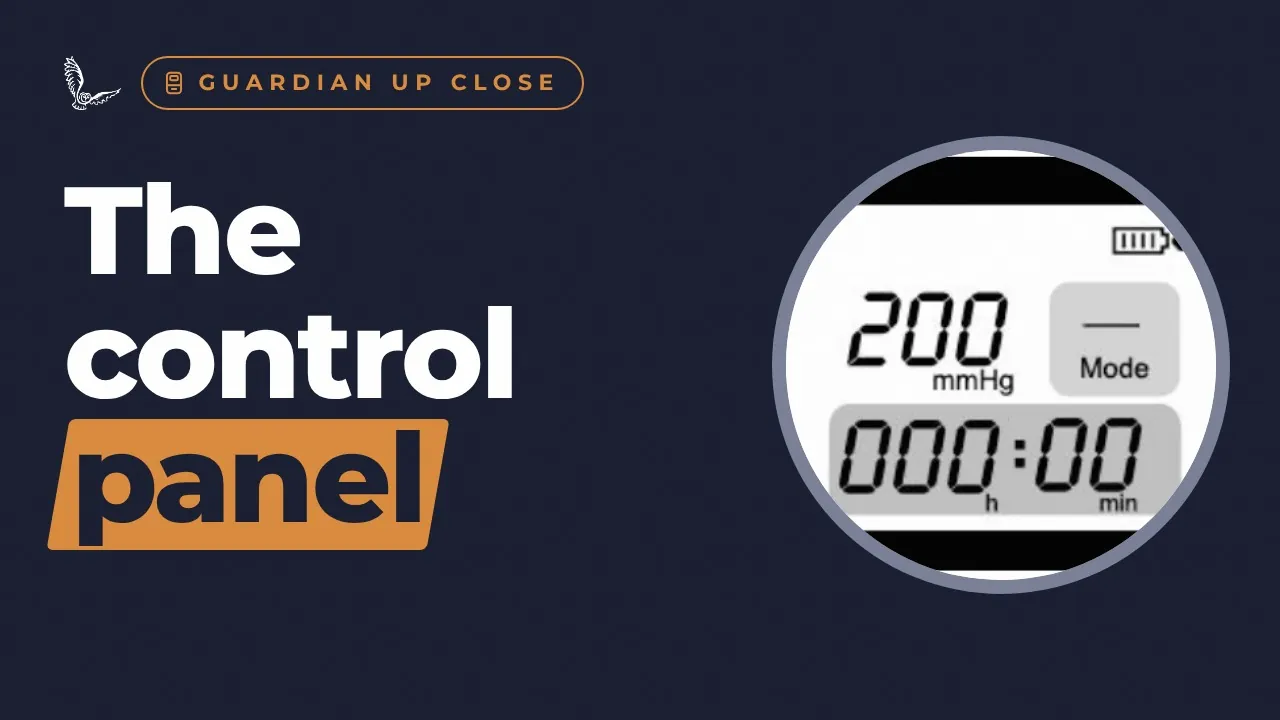
A button-by-button guide to the Aluco Guardian™ NPWT control panel for vet teams: power on and off, choosing the mode, setting the pressure, starting and pausing therapy, locking the screen, reading the display and battery, and what the alarm codes mean.
Three things to remember
- Choose the mode, then the pressure.
- Start, then lock.
- In an alarm, press power once to mute, then fix the cause.
The full episode, written out
This is the narration from the video, so you can read it at your own pace, share it, or come back to a section.
Introduction
Welcome to Aluco Health. I'm Georgie Hollis. This is Guardian Up Close. Today: the control panel on the Aluco Guardian, button by button.
Six buttons
The Guardian has a screen and six soft buttons. On the left: Mode, and the up and down arrows. On the right: Power, Lock, and Start. Let's take them one at a time.
Power
Power. Press it to switch on; the screen is ready within five seconds. To switch off, hold it for three seconds. And in an alarm, press power once to mute the sound while you sort out the cause.
Mode
Mode. Each press cycles through the therapy modes, shown in the box on the screen. Continuous is the default, and recommended. Intermittent runs five minutes on and two minutes off. Once the mode is chosen, set the pressure.
Pressure
The up and down arrows set the pressure, from fifty to two hundred millimetres of mercury, in steps of five. Hold an arrow to change it quickly. The quick start guide gives one hundred to one hundred and fifty for typical veterinary use, and the user guide gives one hundred and twenty-five, continuous, as typical, always with clinical judgement.
Start
Start. Press it and therapy starts, and the timer starts counting. Check the foam collapse and wrinkle under the film: that shows the vacuum is working. Press it again and it pauses therapy and keeps your settings. A long press stops therapy and resets the settings to default.
Lock
Lock. Once the settings are right, press it to lock the screen and buttons, preventing accidental changes. Press it again to unlock.
The screen
The screen shows the pressure, the mode, the therapy time in hours and minutes, and the battery.
The battery
The battery lasts about twelve hours. Before first use, charge it for at least six hours. While it charges, the charging bars move, and four bars means it's full.
Alarm codes
If it alarms, the screen tells you why. H P A, high pressure, usually means a blockage or a full canister. L P A, low pressure, usually means a leak in the dressing or a loose connection. Low battery means less than twenty minutes of therapy left, so plug it in. Press power once to mute, fix the cause, then press power to resume.
Pause it for a while?
So, is it fine to pause therapy for a few hours? No. Never leave a dressing without suction for more than two hours. If you need help with the device, Aluco's clinical support is there for vet teams, round the clock.
Words explained
- HPA
- High pressure alarm: usually a blockage or a full canister.
- LPA
- Low pressure alarm: usually a leak.
- mmHg
- Millimetres of mercury, the unit for suction pressure.
Sources
- S1Aluco Health. Aluco Guardian™ Negative Pressure Therapy System user manual / instructions for use, version 1, December 2024.
- S2Aluco Health. ALUCO GUARDIAN™ negative pressure wound therapy system: quick start guide (2 pages).
- S3Aluco Health. Aluco Guardian™ user guide for trained clinical staff, December 2025.
- S4Aluco Health. Round-the-clock clinical support for veterinary teams (company confirmation, 20 November 2026; user guide: 24/7 clinical support by WhatsApp).
General information about animal wound care, not veterinary advice. Always follow your vet's advice. Aluco Guardian™ is for use by veterinary professionals. Evidence mentioned is not specific to Aluco Guardian™ unless we say so.
See the Aluco Guardian™ in your practice
Hire one for a single case, try it with a demonstration, or buy for a regular caseload. Training and round-the-clock clinical support for vet teams come with it.
Ask your vet whether NPWT could help
Your vet knows your pet best. Take your questions to them, or send them this page.
Watch next
 2:27
11 Feb
Aluco Guardian NPWT carry bag: in the kennel and on walks
 1:59
1 Dec
 3:23
1 Dec
 4:40
1 Dec